Creative project management: Why generic tools break for ad creative teams
Most creative teams use Asana, ClickUp or Monday for project management. Here's why they break when your "tasks" are ad creatives – and what actually works instead.
You've built the board. Tasks move from "In Progress" to "In Review" to "Done." Status updates land in Slack. The spreadsheet tracks which batch goes to which agency.
And still, your media buyer is in your DMs asking where the approved statics are. Your designer just uploaded 40 final files to the wrong Drive folder. And nobody can find the version of the winning hook video that went live on Meta last month.
The problem is that the tools you're using were never built for what you're actually doing.
What creative project management actually requires
Creative project management for ad teams isn't the same problem as project management for a software sprint or a marketing campaign launch.
When the deliverable is a media file that needs to be reviewed frame-by-frame, renamed to a naming convention, approved by multiple stakeholders and pushed live to a paid social platform, the workflow is so different that the usual project management tools are simply a bad fit at high creative volumes.
In order to run this type of workflow efficiently at reasonable cost requires a specific set of capabilities:
1. Review and feedback directly on the asset
In Asana, Clickup or Monday, feedback lives in comment threads attached to a task card. For a static ad, that's awkward but workable. For a 30-second video with five different hooks cut together, it breaks completely. "The transition at 0:14 feels off" in a comment thread sends the editor back to scrub through the whole file. Frame-level comments, time-stamped annotations, and the ability to compare versions side-by-side aren't premium features, they're the baseline for creative review.
General project management tools don't have them because they weren't built for creative files. They were built for tasks.
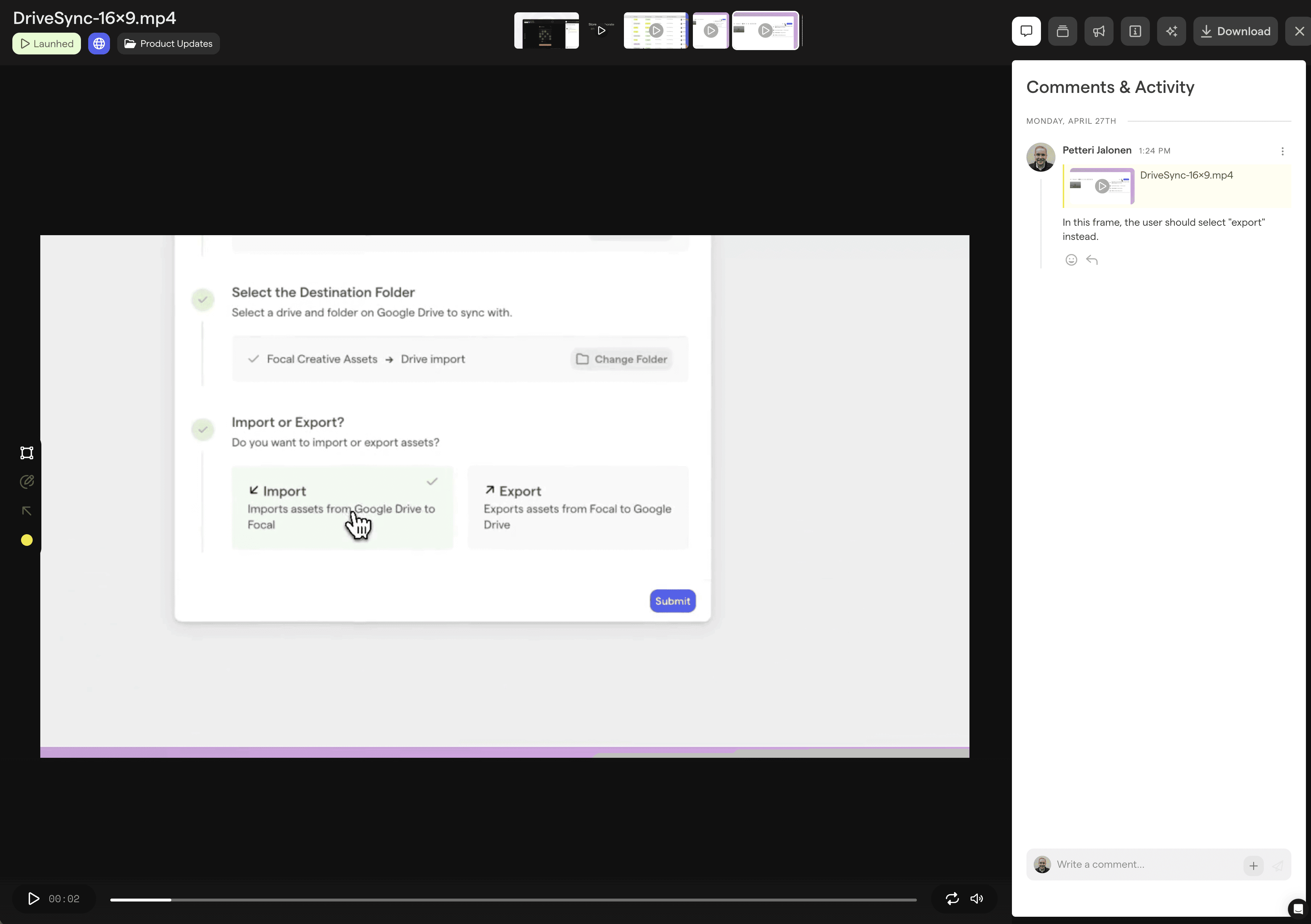
In Focal, videos can be played and comments and annotations added with time codes, so you can precisely comment on specific frames as needed.
2. Asset storage and organization built into the workflow
Most teams run a parallel system: the PM tool tracks the task, and Google Drive or Dropbox stores the actual files. The task card links to a folder. The folder has four versions named `final`, `final_v2`, `final_USETHIS`, and `final_USETHIS_revised`. When the campaign ends, nobody migrates them anywhere — they stay in the sprint folder, buried under the next sprint's folder.
Six months later, nobody can find the video that performed. The institutional knowledge of what was tested and what worked lives in nobody's head and nowhere on the platform.
Genuine creative project management keeps the brief, the asset, the feedback, and the approval status in the same place — not linked between two or more platforms that have no awareness of each other.
3. Naming convention enforcement
Ad creative naming conventions are a reporting dependency, not a preference. If you want to filter Meta performance by creative format, hook type, or target audience, you need those attributes in the naming — consistently, every time.
Asana has no concept of naming conventions. Monday doesn't either. Both platforms will happily let a designer upload `Hook_V3_CORRECTED.mp4` to a task without flagging anything. This means files end up uploaded with incorrect naming conventions, or someone needs to spend hours manually combing over folders and spreadsheets and renaming files. Hacking together some kind of AI tool yourself might help a little bit, but rarely solves the entire naming enforcement issue without errors.
That's why you ideally need a system like Focal that automatically enforces naming conventions on every asset right out of the gate, and can incorporate other elements automatically such as approval status, the actual content of the file (theme, text inside video frames, hooks, etc.), and more.
Get started with better naming conventions: try our free ad naming convention builder
4. Direct channel integration
The last step of most creative production workflows is still manual. Approve the asset in the review tool, download it, open Meta Ads Manager or TikTok Ads Manager, navigate to the creative library, upload the file. Repeat for each format. Rename if the platform requires it.
For a team running 100 new creatives a month, that's hours of work per week — work that adds no creative value and introduces errors at every step.
The problem compounds as creative volumes increase and quickly approaches nightmare levels if you are large advertiser managing multiple production partners or a performance creative agency with more than a dozen customers delivering thousands of creatives.
Project management tools don't solve this because it's not their job. They track whether the task is done. They don't push the deliverable to its destination.
5. Visibility into what's live and what's performing
Asana can tell you a task is complete. It can't tell you whether the creative went live, which ad set it's in, or how it's performing. That information lives in Meta Ads Manager, completely disconnected from the brief that created the ad and the file that delivered it.
For a Creative Strategist trying to build a feedback loop between creative output and performance, that gap is the whole problem. "My designer made 100 statics last month and I don't even know if it went live" isn't a failure of process, it's a failure of tooling.
Why teams stick with Asana and Monday anyway
There are two main reasons. The first is inertia. Asana, ClickUp or Monday is already deployed across the company. IT is familiar with it. The marketing team uses it for campaign planning. Pulling creative production out of the shared tool means managing two systems and having an honest conversation about why the creative team needs something different.
The second is that generic PM tools are genuinely good at what they do. Asana handles task dependencies, due dates, and workload management well. Monday has good reporting and automations. If your creative production volume is low and your ad formats are simple, the workarounds are manageable.
But at scale with multiple agencies, 100+ creatives per month, five platforms, rotating hooks and formats, the workarounds eat the team alive. "We stitched together five different tools just to get an ad out the door" isn't an unusual story. It's the median state of a high-volume performance creative team.
What purpose-built creative project management looks like
In-house performance creative and marketing teams at Supercell and Alinea, as well as creative agency BeHuman manage ad creative production end-to-end in Focal. Briefs, review, approvals, asset library, naming, and channel delivery are all handled in one platform.
With Focal, A Creative Strategist opens one platform in the morning. It's a major difference compared to running the process on three to six different platforms:
Every brief is there.
Every asset in production is tracked by stage.
Feedback from the media buyer lands as a timestamped annotation on the video or playable, not a Slack message.
When an asset is approved, it goes to Meta, TikTok, and YouTube with the naming convention applied automatically. There's no download,manual upload or renaming.
And when the campaign ends, every asset is in the library. Tagged by format, hook type, concept, and performance outcome. The next brief starts from what you know works.
"Focal has allowed me to double my creative output and has dramatically sped up our creative approvals and management."
— Peter McLaughlin, UA Creative Producer, Supercell
A tool built for software sprints will always treat a video file as an attachment to a task. A tool built for performance creative treats the asset as the primary object, with the workflow built around it.
The right question to ask when evaluating creative project management software
It's not "can this tool handle our tasks?" Every project management tool handles tasks.
The right question is: can this tool handle the asset efficiently? That is determined by multiple factors:
Can handle the asset review?
Can it recognize the content of the creative?
Can it name the file according my naming conventions?
Can it store the asset, and actually make it discoverable?
Can the tool connect assets to performance data, and push them live without anyone touching an upload button?
If the answer is no, you're back to stitching together five tools and wondering which of those creatives actually worked.
Want to see how Focal handles creative project management from brief to launch? Book a demo today.