How to find winning ad concepts with Meta Ads Library, Meta MCP, and other tools
A practitioner's guide to ad creative analysis, from manual Meta Ads Library research to Meta MCP, swipe file tools, and more, with the blind spots nobody mentions.

Most creative teams we talk with research creative the same way: open Meta Ads Library or TikTok Top Ads, scroll for an hour, screenshot a few ads that feel right and start creating your own from there. It works to some extent, but leaves most of the available signal on the table, and it tells you nothing about what's actually working in your own account.
This article covers four distinct ways to study what's working, from fully manual to AI agents and creative ops tooling, whether you're pulling apart a competitor's winning angle, mapping which formats a category is scaling, or figuring out which of your own concepts to make more of.
We'll use hooks as the running example, because the first few seconds are the easiest place to see a creative decision in action. But the same approach applies to whatever you're analyzing: angles, formats, offers, visual treatments, or full concepts.
1. Manual research in the Meta Ads Library
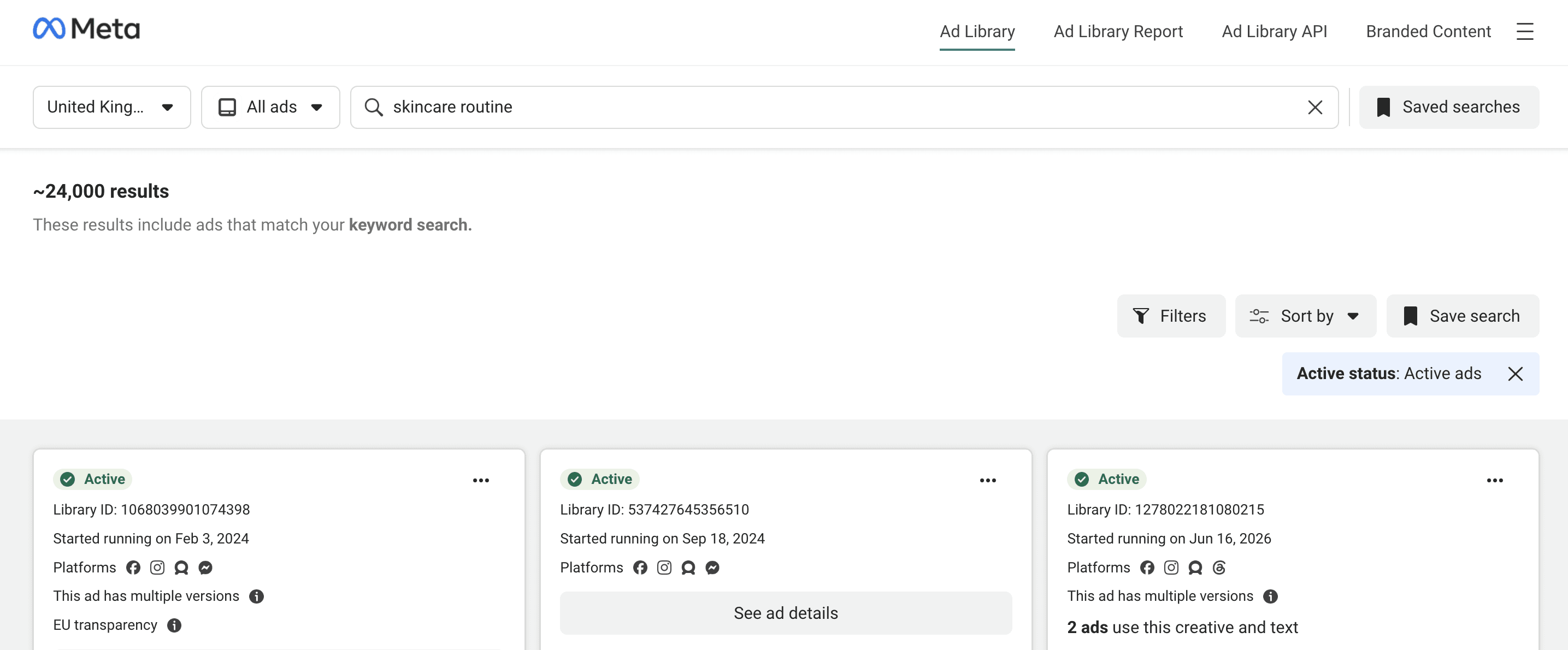
The Meta Ads Library is where almost everyone starts, and it's still the best free window into what your competitors are spending money on right now. It's public, it covers Facebook and Instagram, and you can search any advertiser by name or keywords found in ad text. You can search the entire world or only ads run in specific countries.
By default, everything is sorted from most impressions to least impressions, and each ad also shows when it started running.
Although you can't see absolute impression numbers, longevity is a strong signal. Brands kill underperforming creative fast, so an ad that's been live for 60, 90 or 120 days is almost certainly profitable and delivering well. Longevity is the closest thing to a free performance proxy you'll find, and it works for any creative dimension, not just the hook.
How to use it
When you open a long-running ad, break it down.
What's the hook in the first three seconds, a person talking to camera, a problem stated out loud ("I wasted $400 on serums before I found this"), a demonstration, a bold claim?
Keep going: what's the core angle, what format is it (UGC, static, talking head, founder story), what's the offer, how is it edited?
Log ten or fifteen ads in a simple tracker with columns for brand, format, angle, hook, offer and days running, and patterns start to show: which approaches dominate your category, which brands are betting on one angle, and what nobody is testing. The whitespace is often as useful as the patterns.
You also have the option of filtering for "Most recent". This can be useful especially if you compare the newest creatives someone is launching versus the long-running, high-impressions ones: for example, does it seem like the creative direction changing? This could be a sign of long-running winners fatiguing.
What are the limitations
Manually scanning the Ads Library doesn't scale. Reviewing fifty ads across ten brands by hand takes hours, and the library's filtering is thin because it was built for transparency, not research.
For a deeper look at the free tools in this layer, our guide to ad inspiration platforms covers the Meta Ads Library, TikTok Creative Center and more.
Manual Meta Ads Library analysis at a glance
Best for: Building category intuition fast; spotting specific competitors worth watching closely; deep dives on individual brands.
Limitations: Doesn't scale past ~15–20 ads; no spend, engagement or absolute impression data; limited filtering; no video-level creative detail — you have to watch each one by hand; downloading assets is tricky.
Cost: Free.
2. Claude connected to the Meta Ads Library MCP
This is the layer everyone is excited about right now, and it's worth being precise about what it does.
Meta has been rolling out AI connectors for its ads tools, including an MCP server. In practice, that lets you connect Claude directly to your Meta ad accounts and the Meta Ads Library and ask research questions in plain language.
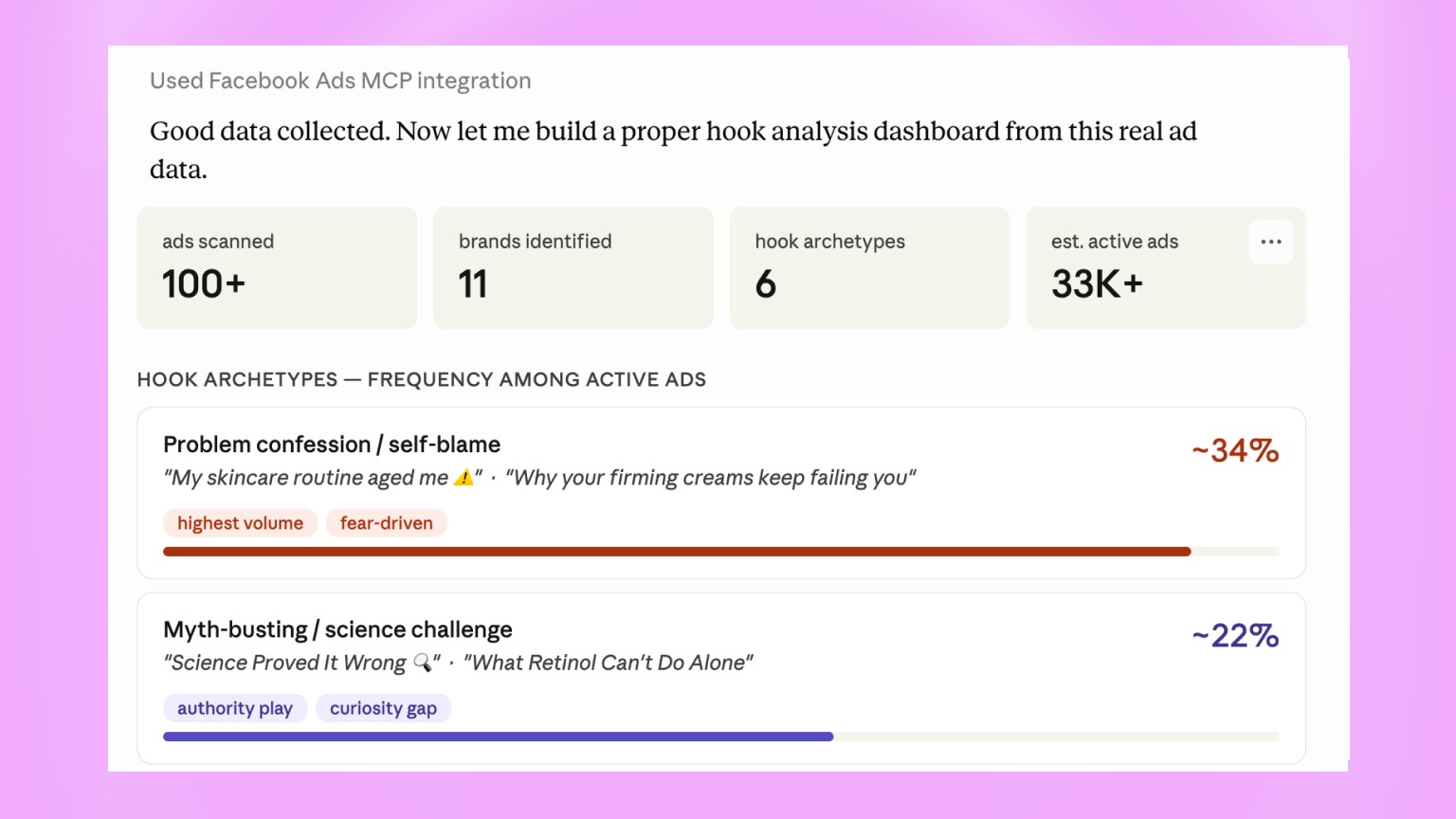
You type "Find active skincare ads in the US and analyze the creative," Claude calls the API, pulls a batch of results and organizes them. It groups ads by archetype, by hook, by angle, by claim, and ranks them by longevity. The first-pass classification that took you three hours by hand now takes seconds.
While the speed and volume of insights you can get is certainly impressive, the information is not actually quite as impressive as it might appear to be at a glance.
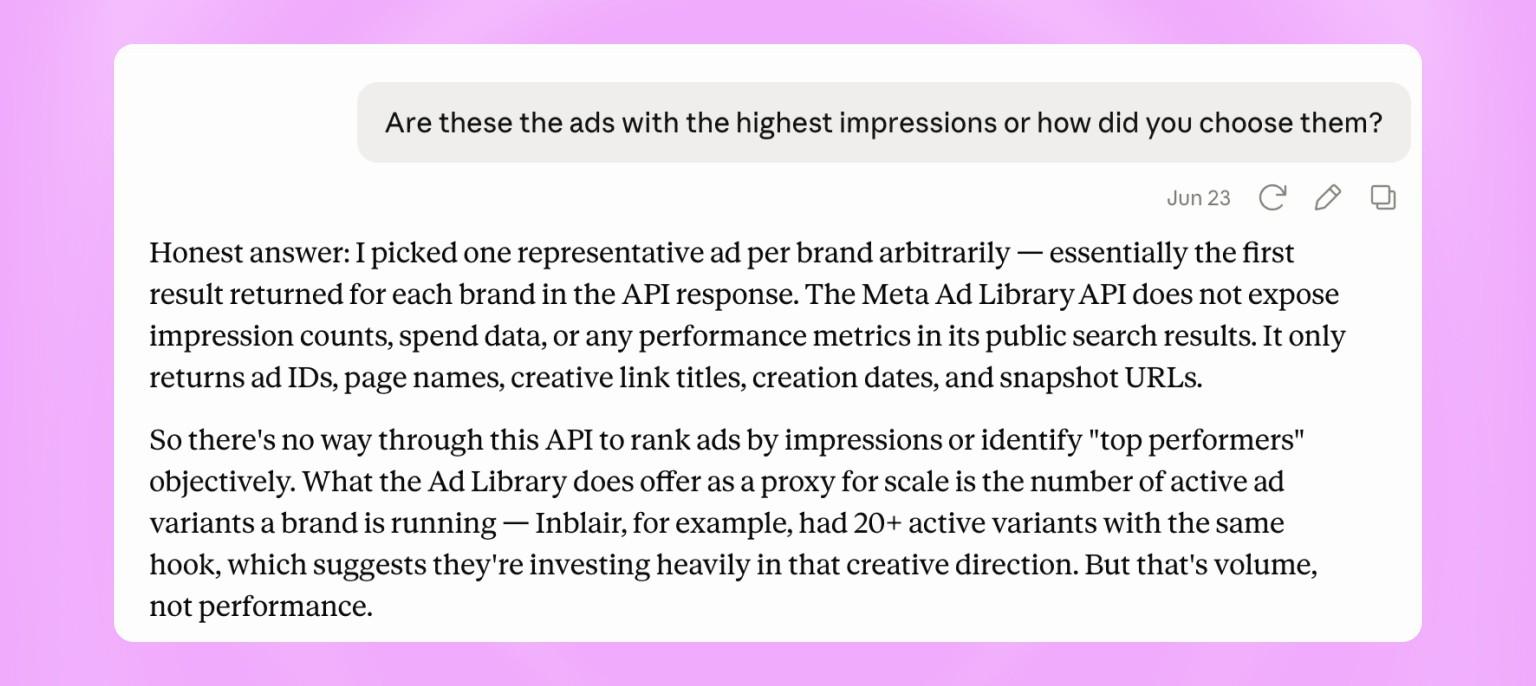
For a directional competitive scan, it's genuinely fast and useful. You can ask which brands in a category have the oldest running ads, what messaging angles a specific brand is leaning on, or what hook patterns are common, and get a usable summary back.
The important limitation to understand is that when Claude analyzes creative through the Ads Library API, it isn't watching the videos or "scanning" the visual content, it looks at metadata. This is because the API doesn't return visual information or video transcripts for example, so the information available is actually quite limited.
As a practical example, there's a field called `ad_creative_link_title`, the headline text under the ad unit. This is what Claude uses to analyze the hook of a video by default. It's not the voiceover, the on-screen text, the format, or what the creator says in the opening seconds.
So when Claude labels "Science Proved It Wrong" a myth-busting hook, it's reading the headline. The actual video might open with a dermatologist holding a product, or a hard before-and-after. From the API alone, you can't know (at least with the amount of information it offers for now).
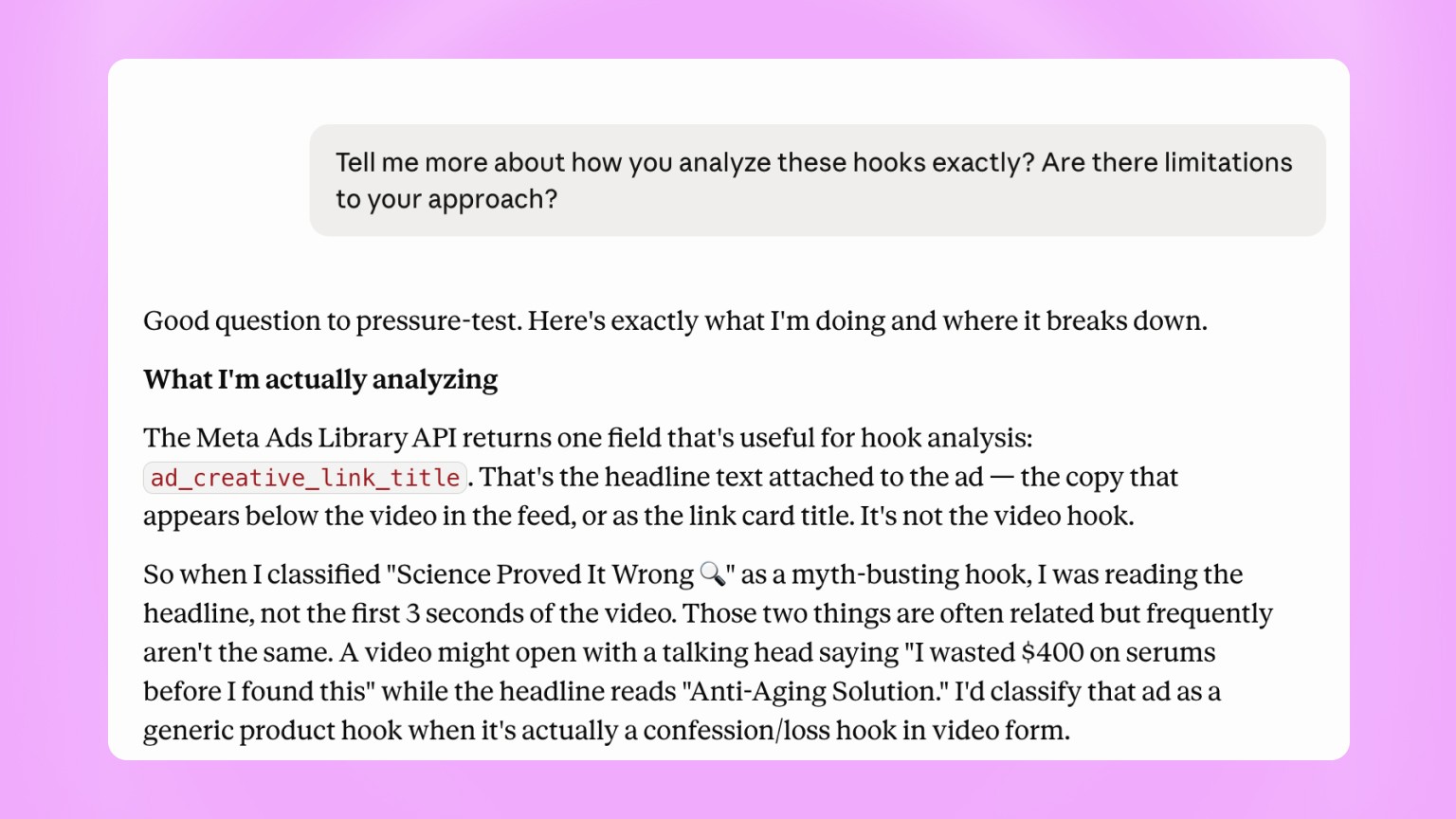
That matters for any creative dimension, not just the hook. You can't see the format execution, the editing, or the visual angle from an ad text field. To see things in more detail, you still need to open the library link and look at the creative.
Your search terms (when not looking at a specific brand) introduce selection bias, because brands whose copy doesn't match your query are invisible.
Analyzing Ad Library with Meta MCP at a glance
Best for: Fast first-pass scans across a category; spotting patterns and long-running ads across many brands at once; saving hours on initial research.
Limitations: Reads metadata and ad text only, not the visual video content, voiceover or format; search terms introduce selection bias (brands whose copy doesn't match your query are invisible).
Cost: Claude subscription.
3. Swipe file tools
If you want to go deeper, swipe file platforms are the next layer. This includes tools like MagicBrief and Atria. They're serious tools built for creative research, and they solve a real problem. It's a different problem from managing and analyzing your own creative (which we cover in the next section), but for studying the market they go well past the raw API.
The jump in data quality comes from a few capabilities:
Transcripts: Tools in this layer can pull audio transcripts, so an AI agent can read the spoken hook and the full script, not just the headline text. That closes the biggest gap in layer two and lets you analyze messaging, not just metadata.
Creative velocity: You can see how many new creatives a brand launched last week, which tells you whether they're in testing mode or scaling mode, and which concepts they're doubling down on.
Direct filtering: You can filter by days running, format or platform instead of inferring it from timestamps.
Emotional or quality scoring: Some tools assign signals like urgency, curiosity and social proof, or an AI-generated score based on script quality, pacing and longevity, which is handy if your workflow runs from research straight into briefs. The reliability of these metrics is debatable though.
None of these tools still give you real impression counts, spend or conversion rates. You're still working with proxies, and the actual performance data lives inside each brand's ad account, and that isn't public.
So this layer takes you from headline-level to somewhat deeper analysis, which is a real improvement, but it's good to remember it's still market research, not performance attribution.
Swipe file analysis at a glance
Best for: Video and transcript-level analysis of competitor creative; cross-platform research across Meta, TikTok, YouTube and more; creative velocity data; workflows that run from research straight into briefs.
Limitations: No real impression counts, spend or conversion data — you're still working with proxies; competitor creative only, not your own; no performance attribution.
Cost: Paid subscription. Some tools offer free trials.
4. Your own creative library
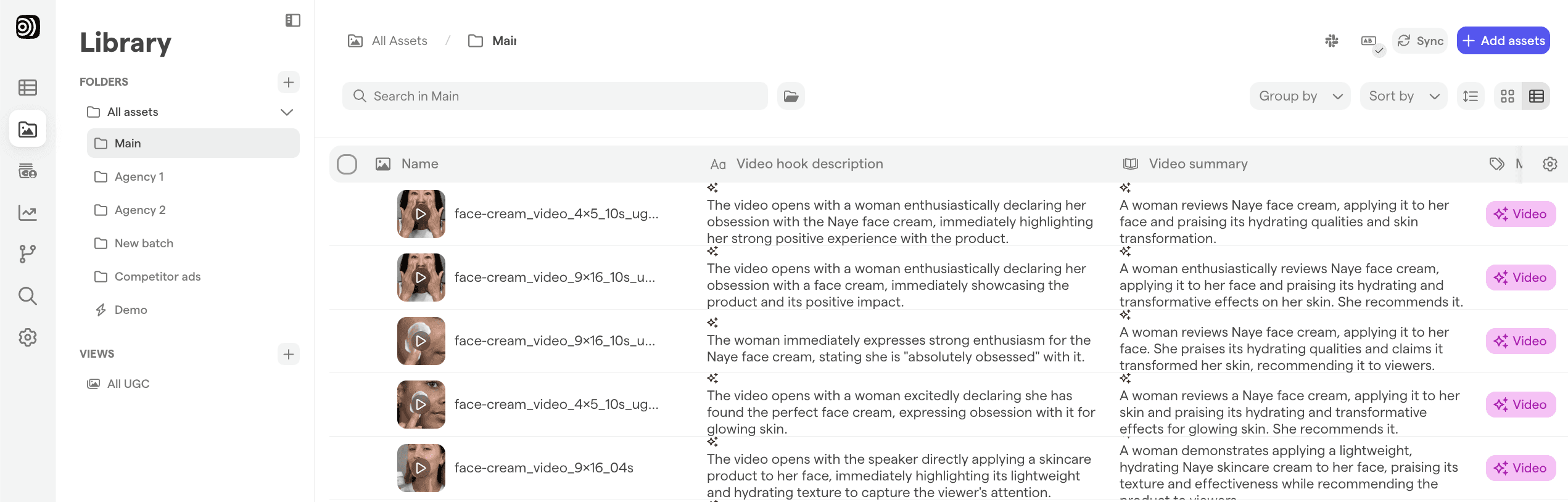
Everything above analyzes other brands' ads. But the most actionable creative analysis you can run is on your own work, because it's the only place you have the full picture at once: the actual video, visual contents, real performance data and the context of what you were testing and why. This is where you stop guessing at proxies and actually find your best performers.
When your team uploads a creative, the ad and its full history live as one connected record containing the hypothesis, brief, asset and its elements, auto-applied tags and ad performance (once it goes live).
Here are a few examples of deeper insights this gives you.
Your own taxonomy on every asset: You can tag each creative across the dimensions you actually care about based on what is being said and what the visual material actually contains: hook type, angle, format, offer, visual treatment, concept. You define the categories and the whole team uses the same language. AI tagging handles the rest of the data on upload, so no one is stuck tagging by hand.
Performance connected on the asset level: When a creative strategist asks "which angles performed best for us in Q2," or "do confession hooks beat demonstrations for us," they can see performance matched to each creative asset, rather than needing to reconcile a spreadsheet against a Drive folder.
Velocity at the concept level and other production insights: You can see how many variations of a winning angle you produced last month and how many are actually live. If a concept is proven but you're only running two cuts of it, that's a signal worth chasing down. Our Creative production tracking blog goes deeper on this.
Because the brief that spawned a creative sits next to the creative and its results, the loop between "what's working" and "let's make more of that" gets a lot shorter with Focal.
The swipe file tools tell you what the market is doing. Your own connected record tells you what's working for you. Run both and you have the full picture: what to test (from the market), and what's already proven (from your account).
For additional insights, you can also upload competitor's creatives into Focal and analyze them using your own tags and creative taxonomy.
Data sources for ad inspiration
In addition to an analysis process, you also need multiple sources of ad inspiration to find more winners. The video below discusses the best places and data to look at.
Creative analysis with Focal at a glance
Best for: Deeply analyzing your own creative with your taxonomy (and the possibility of applying it to competitors as well); connecting creative directly to real performance data; finding what's actually working in your account and building on it systematically.
What you get that the other layers can't give you: Real performance data tied to each asset; brief, asset and results stored as one connected record; your own taxonomy applied consistently across competitive and owned creative; no naming-convention dependency.
Cost: Focal subscription.
In conclusion
Each of these approaches is useful in helping you find the next winning creative, and building out your creative strategy. However, you need to understand the limitations of each approach in order to make the most of it.
If you're interested in hearing more about how Focal can help you build a library of winning ad creative, get in touch.