Ad naming conventions your team actually follows

Ad naming conventions your team actually follows

Name every creative automatically based on metadata, visual content and more, and turn the ad names you already have into data you can report on.

Hero Image
Hero Image

Is your ad naming all over the place?

Every media buyer, agency and editor names ads a little differently, and one missed field breaks the filters, pivots and dashboards that depend on it. Fixing it after launch means renaming ads by hand or cleaning a spreadsheet every month. With Focal, the naming happens before the creative ever reaches the ad account.

Ad naming conventions

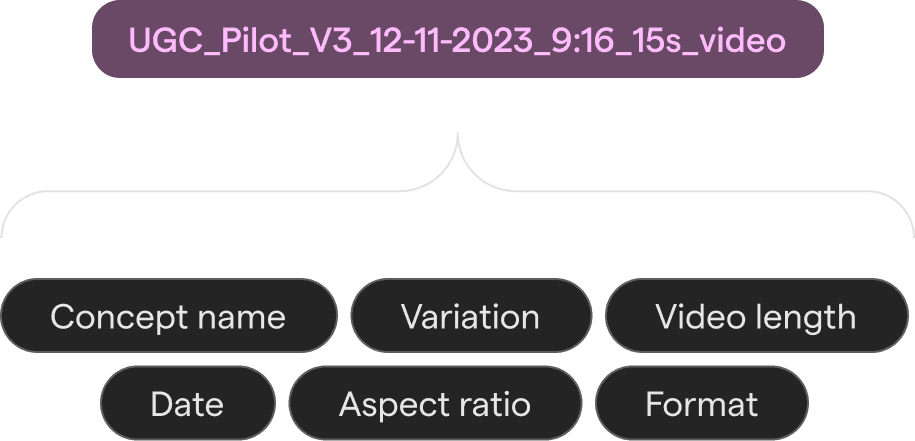
An ad naming convention, enforced from upload

Focal applies your naming convention automatically on upload: files are renamed based on metadata, visual contents and other parameters based on your exact taxonomy.

For us, Focal is the operating layer between creative production and ad launching. It’s the single source of truth for copy, asset naming, translations, and Meta ad fields.

Tom van der Kolk

Co-founder, The Longevity Store

Feature Image
Across channels

Automatic upload to ad channels with correct naming

Approved creatives can be automatically uploaded to Meta, TikTok and YouTube, with proper naming already applied so nobody needs to manage files by hand.

With Workflows, you can even set up Slack or email alerts so media buyers get notified automatically when new creative is available.

Why ambitious creative teams choose Focal

Star
Star

4.7

4.7
/5.0
/5.0

"I can have an end-to-end production from ideation, briefing agency, feedback loops and all the way to export to publishers and get paid ads analytics all in one place. It is so incredibly used friendly."

Rumina T.

Global Creative Strategy Manager

"Their ability to understand the market's biggest challenges and build a single tool that eliminates an incredible number of headaches."

Marko B.

Senior Marketing Art Producer

"What I like most about Focal is its excellent UI/UX. Everything I need is clearly laid out and easy to find, which makes it simple to track tasks and briefs all in one place. The platform’s integrations, along with its Performance AI/Intelligence features, are also extremely valuable."

Ömer S

Creative Marketing

"I'm particularly excited about the production and performance reports - these are very useful for showcasing the work and impact of creative teams to execs, as well as having an overview of the results in the same place."

Karina T.

Senior Creative Marketing Manager

"Highly customisable and great for managing large creative volumes"

Naomi H.

Creative Strategist

"Focal is kind of an easy-to-understand tool for quite complex tasks, especially compared to regular databases or Google Drive. It's pretty structured, intuitive, and easy to use. The filters make things much more visible, clear, and manageable."

Roman B.

"Everything is under one platform, and the information is visually clear, so most people immediately understand how to use it."

Tuomo K.

Creative Producer

"I use Focal for everything creative production, asset management, reviewing work, tagging creatives, and getting creative insights. I love that Focal keeps everything in one place, which helps track creatives and replaces multiple tools like Google Docs, Sheets, and Slack. My favorite part is the automation features, especially auto-renaming, which saves everyone hours and keeps things consistent and tidy."

Becky W.

Senior Marketing Animator

I use Focal for managing creative assets for all marketing and paid campaigns. I love how it's so easy to use and very adaptable to any needs my team might have. It keeps everything organized in a clear visual way and keeps everyone on the team up-to-date on the tickets and tasks, like who needs to produce them, what each creative asset's brief is, priority level, production phase, etc.

Verified G2 User

"I can have an end-to-end production from ideation, briefing agency, feedback loops and all the way to export to publishers and get paid ads analytics all in one place. It is so incredibly used friendly."

Rumina T.

Global Creative Strategy Manager

"Their ability to understand the market's biggest challenges and build a single tool that eliminates an incredible number of headaches."

Marko B.

Senior Marketing Art Producer

"What I like most about Focal is its excellent UI/UX. Everything I need is clearly laid out and easy to find, which makes it simple to track tasks and briefs all in one place. The platform’s integrations, along with its Performance AI/Intelligence features, are also extremely valuable."

Ömer S

Creative Marketing

View all Reviews

"I'm particularly excited about the production and performance reports - these are very useful for showcasing the work and impact of creative teams to execs, as well as having an overview of the results in the same place."

Karina T.

Senior Creative Marketing Manager

"Highly customisable and great for managing large creative volumes"

Naomi H.

Creative Strategist

"Focal is kind of an easy-to-understand tool for quite complex tasks, especially compared to regular databases or Google Drive. It's pretty structured, intuitive, and easy to use. The filters make things much more visible, clear, and manageable."

Roman B.

"Everything is under one platform, and the information is visually clear, so most people immediately understand how to use it."

Tuomo K.

Creative Producer

"I use Focal for everything creative production, asset management, reviewing work, tagging creatives, and getting creative insights. I love that Focal keeps everything in one place, which helps track creatives and replaces multiple tools like Google Docs, Sheets, and Slack. My favorite part is the automation features, especially auto-renaming, which saves everyone hours and keeps things consistent and tidy."

Becky W.

Senior Marketing Animator

I use Focal for managing creative assets for all marketing and paid campaigns. I love how it's so easy to use and very adaptable to any needs my team might have. It keeps everything organized in a clear visual way and keeps everyone on the team up-to-date on the tickets and tasks, like who needs to produce them, what each creative asset's brief is, priority level, production phase, etc.

Verified G2 User

"I can have an end-to-end production from ideation, briefing agency, feedback loops and all the way to export to publishers and get paid ads analytics all in one place. It is so incredibly used friendly."

Rumina T.

Global Creative Strategy Manager

"Everything is under one platform, and the information is visually clear, so most people immediately understand how to use it."

Tuomo K.

Creative Producer

"Highly customisable and great for managing large creative volumes"

Naomi H.

Creative Strategist

"What I like most about Focal is its excellent UI/UX. Everything I need is clearly laid out and easy to find, which makes it simple to track tasks and briefs all in one place. The platform’s integrations, along with its Performance AI/Intelligence features, are also extremely valuable."

Ömer S

Creative Marketing

I use Focal for managing creative assets for all marketing and paid campaigns. I love how it's so easy to use and very adaptable to any needs my team might have. It keeps everything organized in a clear visual way and keeps everyone on the team up-to-date on the tickets and tasks, like who needs to produce them, what each creative asset's brief is, priority level, production phase, etc.

Verified G2 User

"I'm particularly excited about the production and performance reports - these are very useful for showcasing the work and impact of creative teams to execs, as well as having an overview of the results in the same place."

Karina T.

Senior Creative Marketing Manager

"Their ability to understand the market's biggest challenges and build a single tool that eliminates an incredible number of headaches."

Marko B.

Senior Marketing Art Producer

"I use Focal for everything creative production, asset management, reviewing work, tagging creatives, and getting creative insights. I love that Focal keeps everything in one place, which helps track creatives and replaces multiple tools like Google Docs, Sheets, and Slack. My favorite part is the automation features, especially auto-renaming, which saves everyone hours and keeps things consistent and tidy."

Becky W.

Senior Marketing Animator

"Focal is kind of an easy-to-understand tool for quite complex tasks, especially compared to regular databases or Google Drive. It's pretty structured, intuitive, and easy to use. The filters make things much more visible, clear, and manageable."

Roman B.

View all Reviews

Everything behind a clean naming convention
Feature Image

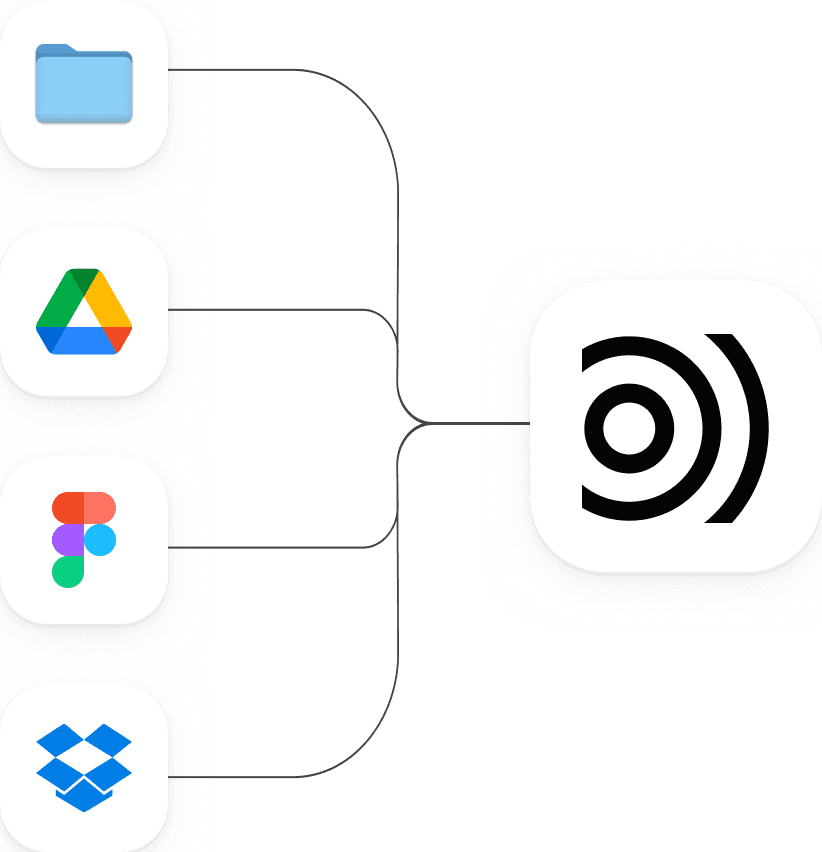
Connect Google Drive or Dropbox and your existing folders are synced and analyzed automatically.

Feature Image

Every concept and variant gets a unique ID, so every version traces back to the original idea.

Tag hook, format and language automatically and use those tags in your naming convention.

Feature Image
Feature Image

Set the rule once per folder and every upload is renamed to match.

Feature Image

Upload properly named creatives to Meta and TikTok automatically, no manual downloading or uploading needed.

Take your creative workflow to the next level

Creative workflows, assets and insights in one unified platform

Dashboard

Take your creative workflow to the next level

Creative workflows, assets and insights in one unified platform

Dashboard

Take your creative workflow to the next level

Creative workflows, assets and insights in one unified platform

Dashboard