Pin comments to the exact frame, draw on the video and keep every round of feedback on the creative itself.

Feedback is all over the place
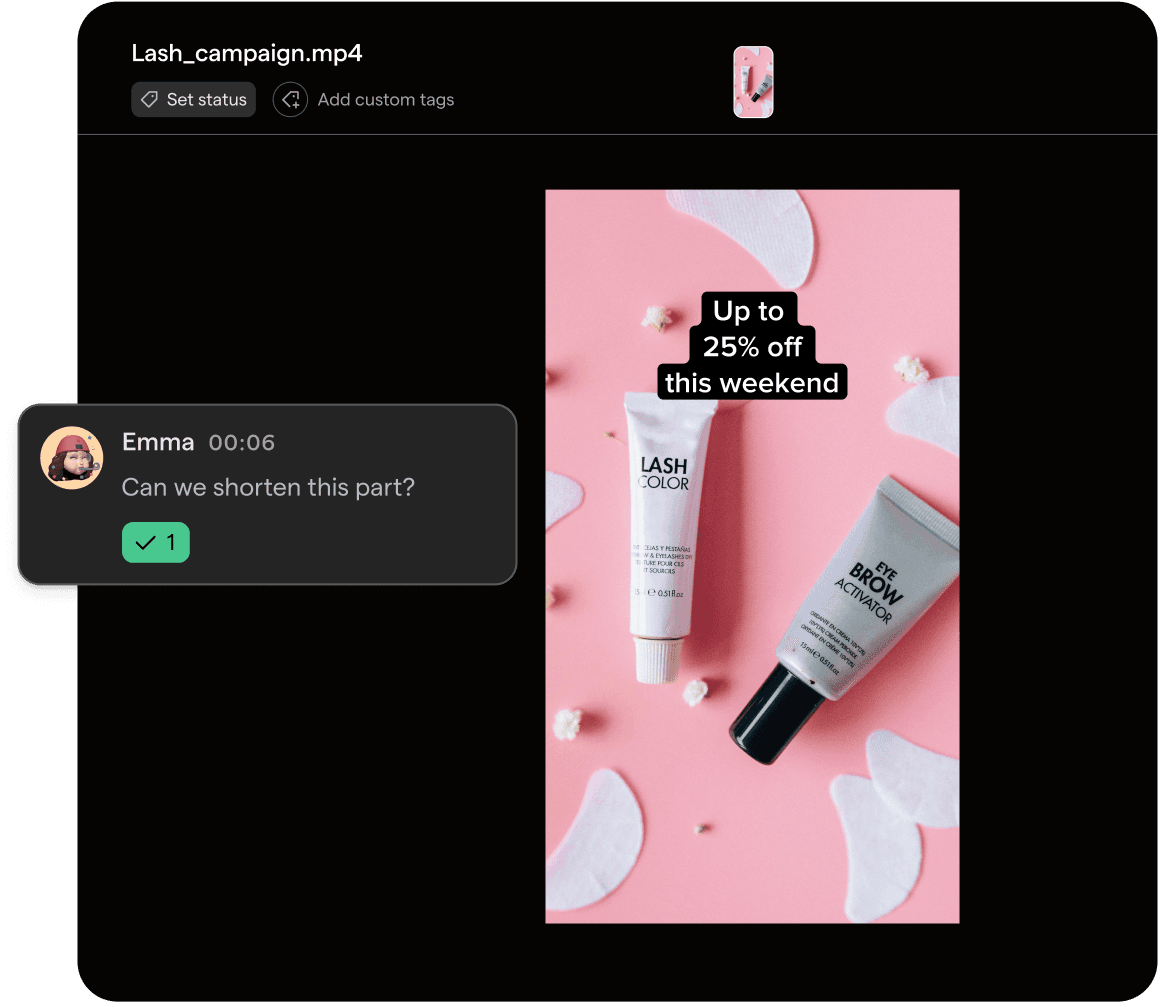
“At 0:07 the logo is too small” gets lost somewhere between a Slack thread, an email and a comment on a slide. The editor has to guess which frame you meant and which version you were watching. With Focal, the feedback sits on the frame it’s about.
Video review
Frame-accurate comments and annotations
Focal’s media player lets your team review videos and statics without downloading anything. Pin a comment to the exact frame, draw an annotation on it, attach files and mention teammates. Replies and reactions stay in one thread on the asset. Send any comment to Slack too, and replies there sync back to Focal.
Guest review
Agencies and freelancers review only what's relevant
While you can see everything in production at once, a guest sees only the boards and values shared with them, so they can review and submit work, without seeing any sensitive data.

Step 1
Open the creative
Play any video or static in the Focal media player, right from the library or a board.
Step 2
Comment on the frame
Pause and write. The comment is pinned to that timestamp, and you can draw on the frame to show exactly what to change.
Step 3
Upload the next version
The editor drops a new version onto the same asset, so feedback and revisions stay together.
Explore related features
Version history
Keep every revision of a creative on the same asset.
Approval statuses
See where every creative stands, from draft to live.
Shared collections
Share finished creatives with a link, no seat needed.


